




Table of Contents
2. About NAW and the Nucleus Project
6. Search and Response Behavior
7. Content Sources and Relevance
1. Introduction
The NAW Nucleus Chatbot is a generative AI-powered assistant developed to help members of the National Association of Wholesaler-Distributors (NAW) quickly find answers, explore industry knowledge, and navigate NAW’s digital resources. Built on a secure AI platform and integrated with NAW’s existing content systems, such as Salesforce, WordPress, MDM, and the NAW Digital Library, the chatbot delivers reliable, real-time responses tailored to member needs.
This user guide will walk you through how to access and interact with Nucleus, understand the types of content it draws from, and explore key features such as natural language search, source linking, and admin tools for data and user management.
2. About NAW and the Nucleus Project
The National Association of Wholesaler-Distributors (NAW) is a leading voice for the wholesale distribution industry, providing advocacy, education, networking, and research to support its members’ growth and success.
To enhance access to its extensive knowledge base and digital resources, NAW launched the Nucleus Project, a strategic initiative developed in partnership with ProfitOptics. The Nucleus platform integrates cutting-edge generative AI into the Nucleus system to create a smarter, more responsive way for members to find answers and insights.
What Is the Nucleus Project?
Nucleus is an AI-driven assistant embedded within the Nucleus platform. It is designed to deliver accurate, real-time answers to member questions by searching across NAW’s trusted data sources. The system combines natural language understanding with structured data access to deliver consistent, relevant, and context-aware responses.
Key Capabilities of Nucleus
- Fast, AI-generated responses
Quickly delivers answers to natural language queries using large language model (LLM) technology. - Smart content discovery
Retrieves content from multiple sources, including Salesforce, NAW, and MDM WordPress sites, and the NAW Digital Library. - Seamless integration with NAW systems
Enables interaction with both curated documents and peer-generated insights through the Nucleus platform. - Retrieval-Augmented Generation (RAG) foundation
Combines AI model capabilities with NAW’s internal content to ensure that answers are accurate, current, and grounded in official resources.
3. Getting Started
Accessing the NAW Nucleus Chatbot is quick and secure. Nucleus is available through a dedicated portal where NAW members can log in to ask questions, explore resources, and engage with AI-generated insights.
How to Access the Platform
- Go to: https://nucleus.naw.org/login
- Log in using your NAW member credentials OR NAW Member Association Credentials
- Once logged in, you will be directed to the Nucleus interface where you can begin submitting questions.
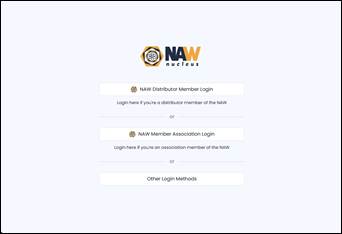
Screenshot: NAW Nucleus login screen showing options for Distributor Members, Association Members, and other methods.
4. Key Features
The NAW Nucleus Chatbot is built to deliver an intuitive, efficient, and context-aware experience for members seeking insights across NAW’s vast library of knowledge. Below is a breakdown of the core features that make Nucleus a powerful self-service tool for information discovery and decision support.
| Feature | Description |
| Natural Language Queries | Members can ask questions in plain English, such as “What is the latest policy paper on supply chain resilience?” The chatbot interprets queries using conversational language patterns. |
| Deep Content Integration | The system is connected to NAW’s key content sources, including Salesforce, MDM, eBooks, whitepapers, and WordPress-based articles. |
| Real-Time Updates | Content from integrated systems is synced on a scheduled basis (overnight), ensuring that responses are based on the most current data. |
| Source Linking | Responses include direct links to the source materials (e.g., articles, reports), allowing users to access full context when needed. |
| Smart Context Awareness | The chatbot tailors responses based on role, topic, and content type—delivering relevant answers whether the user is a distributor, manufacturer, or NAW staff member. |
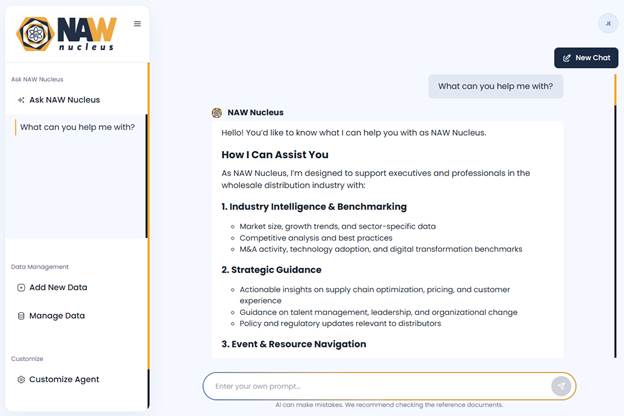
Screenshot: Chat interface showing a user question and Nucleus response.
5. How to Use the Chatbot
Nucleus is designed to be intuitive and straightforward. Whether you’re searching for a specific document, policy update, or insight from NAW’s knowledge base, the chatbot streamlines the process through natural language interaction.
Step-by-Step Guide
- Enter your question
Use everyday language to ask a question, such as:
“What are the latest trends in wholesale distribution?” or
“Where can I find NAW’s most recent economic report?” - Review the response
The chatbot will generate a concise answer, drawing from NAW’s official content sources such as Salesforce, the Digital Library, or WordPress articles. - Explore linked content
If the response includes references, click on the embedded links to access the full source document, report, or webpage for additional context. - Refine or ask follow-up questions
You can ask follow-ups or rephrase your query to dig deeper. The chatbot retains short-term context to help refine responses. - Use feedback tools
After reviewing a response, give feedback using the thumbs-up/down icons to help improve future results.
Example Queries
- “Who are the key contacts for NAW member onboarding?”
- “What are the top three challenges in wholesale distribution post-COVID?”
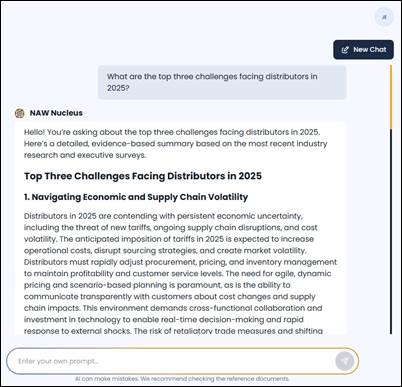
Screenshot: User asks about top challenges for distributors in 2025; Nucleus provides an in-depth, categorized response based on current research.
6. Search and Response Behavior
Nucleus uses metadata tagging to provide accurate responses. Tags include:
- Topic Tagging
Every document is categorized by subject matter (e.g., tax policy, workforce development, cybersecurity), allowing the chatbot to prioritize results based on the intent of the question. - Source Tagging
Responses are pulled from authoritative content sources such as NAW WordPress, MDM, and Salesforce. The source is factored into the ranking and can also be referenced in the response. - Document Type Identification
The system recognizes the format and context of the content—whether it’s a policy report, webinar transcript, article, or eBook—so it can tailor responses accordingly. - Date Relevance
All content is tagged by publication date to ensure the chatbot emphasizes the most recent and timely information, especially for time-sensitive inquiries. - Tone and Voice Customization
System prompts and configurations are aligned to NAW’s communication style, ensuring that answers sound professional, informative, and consistent with NAW’s brand voice.
7. Content Sources and Relevance
The NAW Nucleus Chatbot provides responses based on structured content from NAW’s official systems. Rather than relying on open internet sources, Nucleus is grounded in verified, curated content from NAW’s internal platforms and trusted partners. This ensures responses are reliable, accurate, and aligned with NAW’s standards.
Primary Content Sources
Nucleus draws from NAW’s most trusted content repositories. Each source plays a specific role in shaping the accuracy and relevance of the chatbot’s responses:
- Salesforce
- Member records
- Contact information
- Program enrollment details
- WordPress (NAW & MDM)
- Published articles
- Newsletters
- Event summaries
- Policy briefings
- NAW Digital Library
- Research reports
- eBooks
- Industry whitepapers
Content Syncing and Freshness
Content is updated on a scheduled basis through automated syncing. This ensures that users receive answers based on the most up-to-date information available from NAW’s official sources. This is currently done overnight.
Note: Real-time web crawling or live scraping of new content is not included in the current version. Content must be imported and tagged through approved data channels.
Closing Summary
The NAW Nucleus Chatbot is a strategic tool making knowledge more accessible, actionable, and immediate for NAW members. By combining generative AI technology with NAW’s trusted content ecosystem, Nucleus empowers users to get answers faster, discover insights more easily, and engage with information in a way that is both intuitive and reliable.
This guide has outlined:
- How to access and interact with Nucleus using natural language
- The core features that enhance usability and accuracy
- The sources of content that power the chatbot’s intelligence
As the platform evolves, feedback from users and administrators will continue to shape improvements. Whether you’re a member seeking quick answers or an admin maintaining the knowledge base, Nucleus is designed to support a smarter, faster, and more connected experience within the NAW community.
If you have questions, ideas, or feedback, please reach out to ProfitOptics, [email protected]